Zen Inbox Cleaner

How it works
Clean by sender, not one email at a time
Is your Gmail inbox full of newsletters, promotions, and bulk mail you never read? Instead of deleting emails one by one, Zen Inbox Cleaner shows you exactly who is cluttering your inbox — and lets you clean it all up with a single tap.
Scan & group
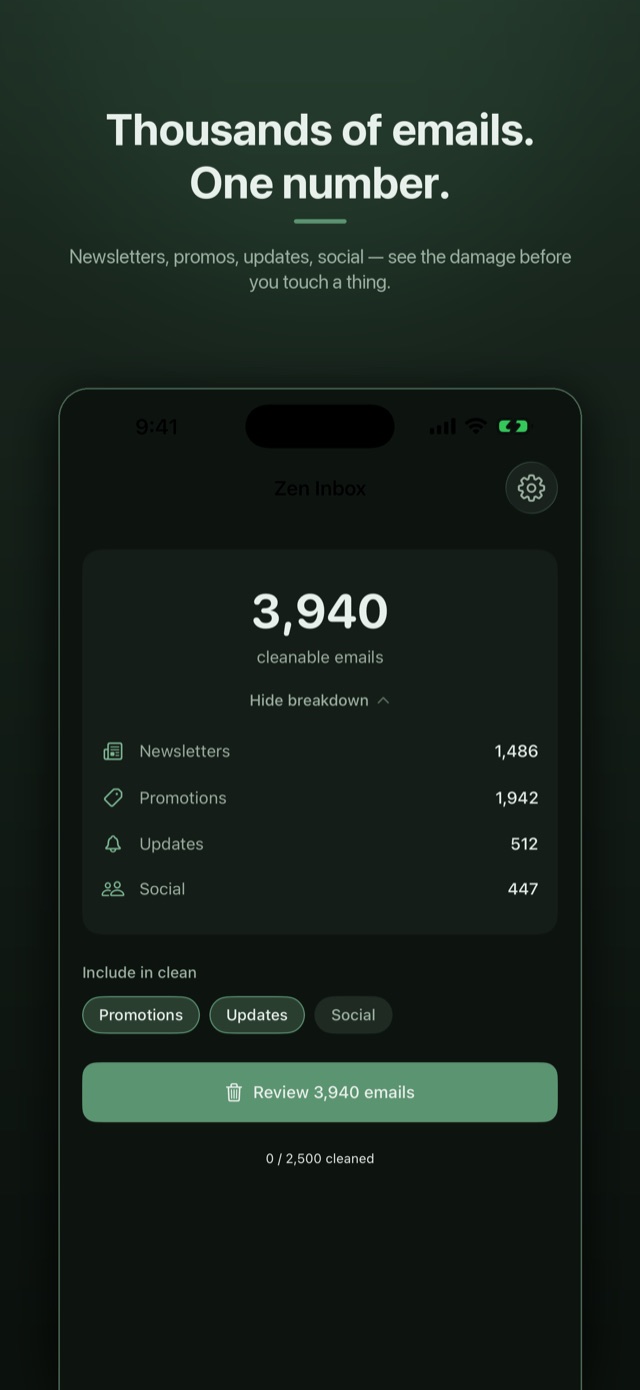
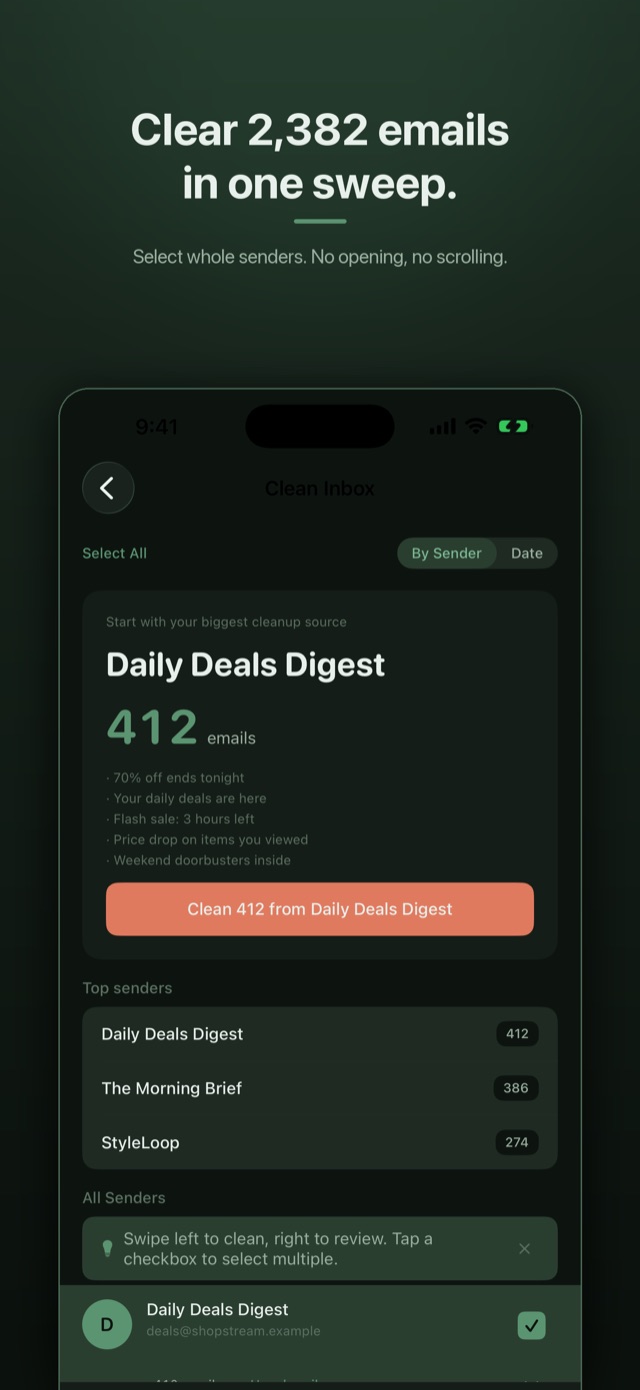
The app scans your Gmail and groups emails by sender — see at a glance that one newsletter has sent you 312 emails, a promo address 87, and so on.
Select senders
Pick one sender or dozens at once. Swipe to clean or review, or tap into a sender to see their recent emails before deciding.
Clean
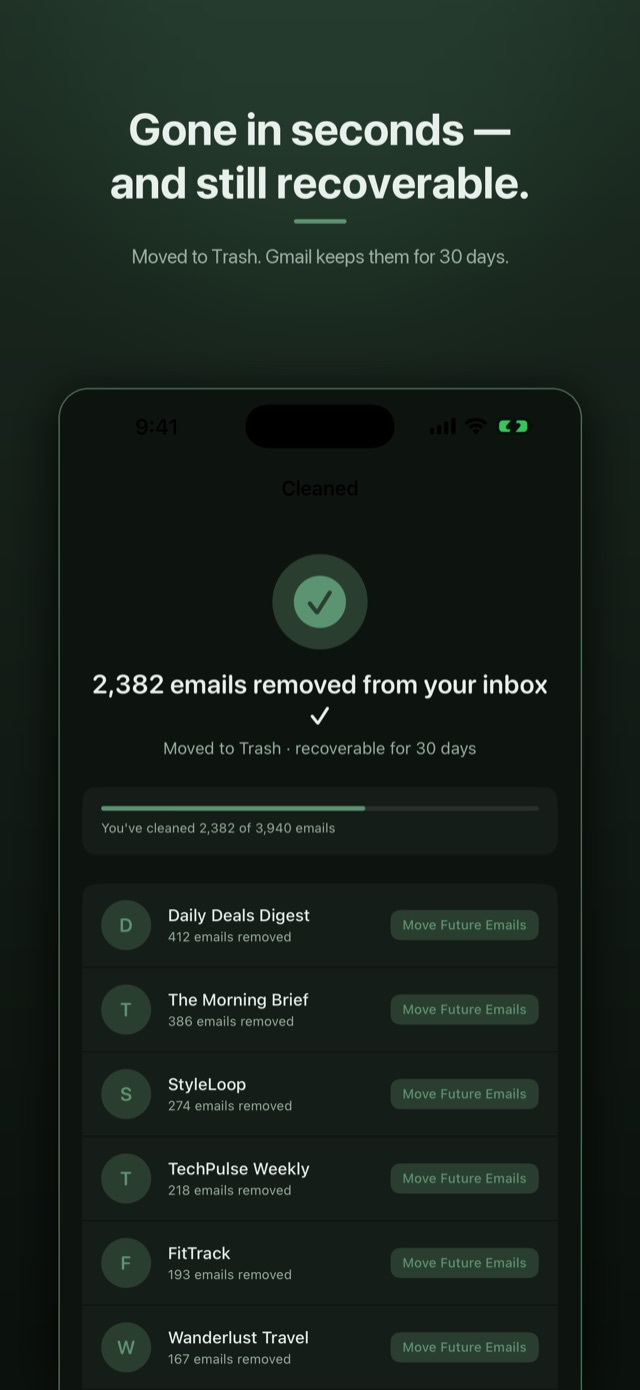
Tap Clean and they move to Gmail Trash in seconds — recoverable for 30 days, so nothing is ever permanently deleted by the app.
See it in action
The whole cleanup, in five screens
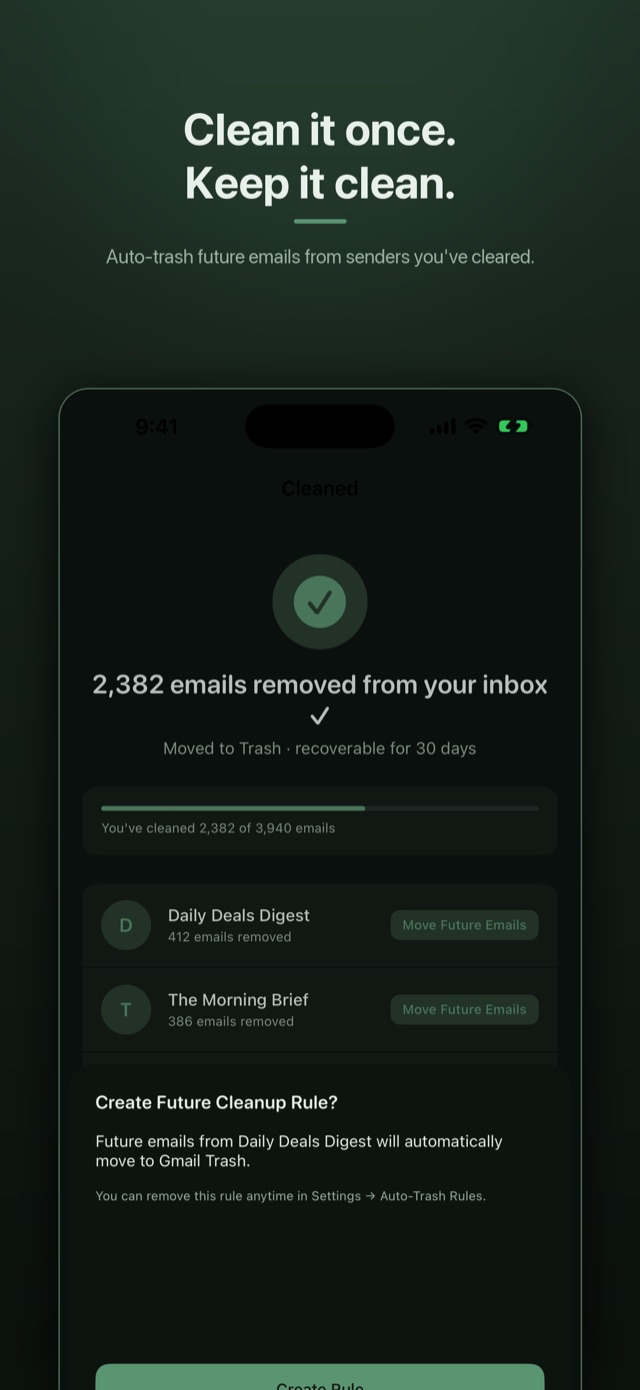
Every screenshot below shows Demo Mode — sample data, no real inbox.
Features
Everything you need to reach inbox zero
- Bulk clean by senderSee your top senders ranked by email count and clear them in one tap.
- One-tap unsubscribeSends the standard one-click unsubscribe request from the email's own List-Unsubscribe header — so future emails stop too.
- Auto-trash rulesBlock a sender once and future emails go straight to Trash. It's a real Gmail filter — visible and manageable in Gmail itself.
- Search & reviewSearch senders by name, email, or domain; review a sender's recent emails before cleaning.
- Your data, exportableExport your cleaning history, unsubscribe requests, and auto-trash rules as CSV files any time.
- Clean exitSign out and all local data is wiped instantly. Delete Account & Data revokes the app's Gmail access entirely.
Privacy
Privacy first — always
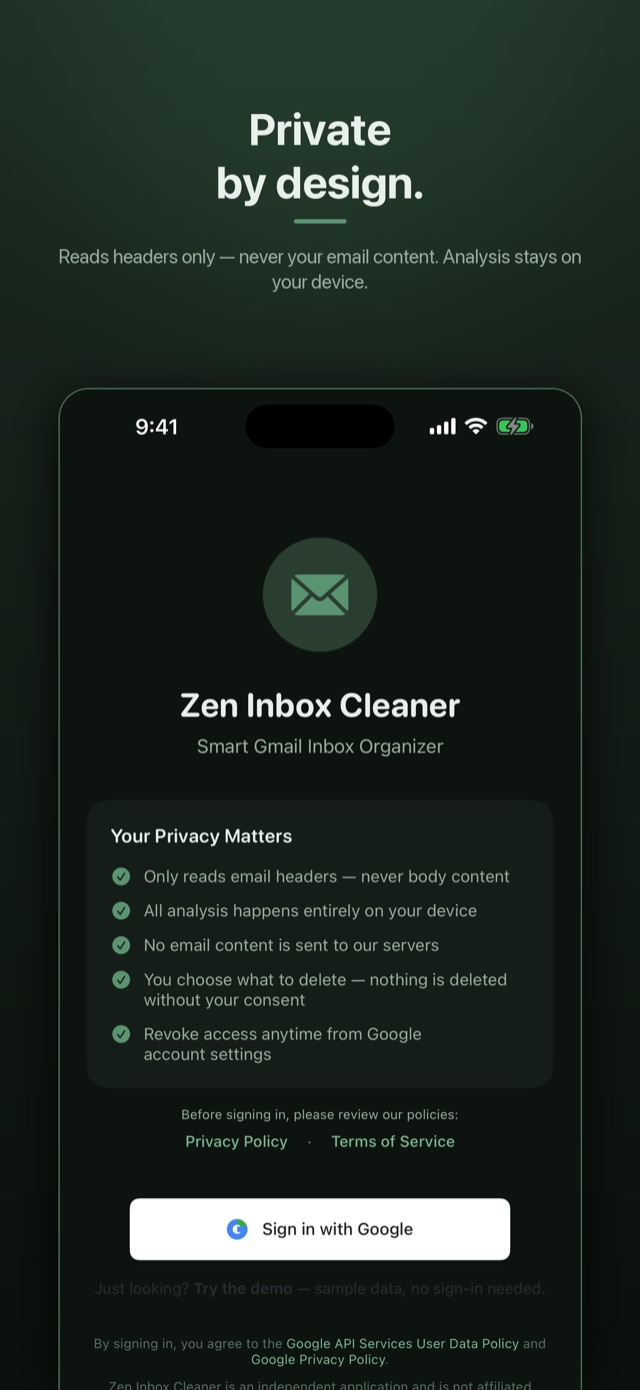
Zen Inbox Cleaner never reads your email content.
- Independently security audited. Zen Inbox Cleaner passed the App Defense Alliance's CASA Tier 2 security assessment — the independent audit required for apps that access Gmail — performed by TAC Security, an authorized lab. Read the security overview.
- Metadata only. The app reads email headers — sender, subject, date, and unsubscribe information. No email bodies, no attachments, no message content — ever.
- No servers of our own. Your device talks to Google's Gmail API directly over HTTPS. There is no Zen Inbox Cleaner server, database, or cloud that touches your data.
- No tracking, no ads, no analytics. No third-party tracking or analytics SDKs are in the app. It is completely ad-free.
- Three narrow Google permissions. The app requests exactly three OAuth scopes — to identify your account, read email metadata and move messages to Trash on your confirmation, and manage the optional cleanup filters.
Full details, including data storage, deletion, and Google API Limited Use compliance: read the Privacy Policy.
Common searches
Answers to what people actually ask
Is there an app to clean Gmail without giving access to my email content?
Yes. Zen Inbox Cleaner reads email metadata only — sender, subject, date, and unsubscribe headers. Email bodies and attachments are never read. Processing happens on your device, which talks to Google's Gmail API directly; there is no Zen Inbox Cleaner server, database, or cloud in the path. The app passed the App Defense Alliance's CASA Tier 2 security assessment, the independent audit required for apps that access Gmail.
How do I bulk unsubscribe from Gmail on iPhone?
Open a sender and tap unsubscribe — the app uses the unsubscribe method the sender itself declares in its List-Unsubscribe header: a standard RFC 8058 one-click request where the sender supports it, the sender's own unsubscribe page in a secure in-app browser otherwise, or a pre-filled email as a last resort. Pair it with an auto-trash rule — a real Gmail filter on your account — so anything the sender still sends skips your inbox.
How do I delete thousands of emails in Gmail at once?
Group your inbox by sender instead of working through it one message at a time. Zen Inbox Cleaner ranks senders by how many emails they have sent you, so you can select whole senders at once and move all of their mail to Gmail Trash in a single tap. Trashed email stays recoverable for 30 days — nothing is permanently deleted by the app.
More storage questions — including the ones this app can't fix? Browse all the answers: phone vs Google storage, Photos and Drive cleanup, why deleting emails doesn't free space instantly, and more.
Curious how bad yours is? Try the Email Hoarder Calculator.
Pricing
Free to start. Then pick the plan that fits.
Free
$0
- Clean up to 2,500 emails
- 250 more emails every month
- One-tap unsubscribe
- Up to 3 auto-trash rules
- All privacy protections included
Zen Pro Monthly
$6.99 · per month
- Unlimited cleaning
- Unlimited auto-trash rules
- ₹299 per month in India
- Cancel anytime
Zen Pro Annual
$19.99 · per year
- Unlimited cleaning
- Unlimited auto-trash rules
- ₹799 per year in India
- Cancel anytime
Zen Pro Lifetime
$59.99 · one-time
- Unlimited cleaning
- Unlimited auto-trash rules
- ₹1,499 one-time in India
- Pay once, no renewal
- Includes Apple Family Sharing
Monthly and annual plans renew automatically until cancelled in your App Store or Google Play settings. The lifetime purchase is a one-time charge. Prices are shown in your local currency in the app store and may vary by region. Payment is handled by Apple or Google — in India that includes UPI, including UPI Autopay for the monthly and annual plans.
FAQ
Common questions
How much does Zen Inbox Cleaner cost?
The app is free to use for up to 2,500 emails and 3 auto-trash rules, and the free plan adds 250 more emails every month (unused monthly emails don't carry over). Zen Pro removes the limits and is available three ways: a monthly plan at $6.99 per month (₹299 in India), an annual plan at $19.99 per year (₹799 in India), or a one-time lifetime purchase at $59.99 (₹1,499 in India). All three unlock exactly the same features. The monthly and annual plans renew automatically and can be cancelled anytime in your App Store settings; the lifetime purchase is a one-time charge with no renewal.
Is there a subscription, or can I pay once?
Both. You can subscribe monthly or annually, or pay once for the lifetime purchase at $59.99 (₹1,499 in India) — a one-time charge with no renewal. Apple Family Sharing is included with the lifetime purchase.
Are my emails deleted permanently?
No. Cleaned emails are moved to Gmail Trash, where Google keeps them for 30 days before removing them automatically. You can restore any email from Trash during that window — from Zen Inbox Cleaner or directly in Gmail.
Can the app read my email content?
No. The app requests email metadata only — sender, subject, date, and unsubscribe headers. Email bodies and attachments are never read, stored, or transmitted. See the Privacy Policy for the exact scopes and what each is used for.
How does unsubscribe work?
The app follows the unsubscribe method the sender itself declares in its email headers: a standard one-click unsubscribe request where supported, the sender's own unsubscribe page in a secure in-app browser otherwise, or a pre-filled email as a last resort. The sender processes the request — the app just makes it one tap.
Do I need a new account?
No. You sign in with your existing Google account. Sign out at any time and all local data is wiped instantly.
Has the app been independently security tested?
Yes. Zen Inbox Cleaner completed the App Defense Alliance's Cloud Application Security Assessment (CASA) Tier 2 — the independent security assessment required for apps that access Gmail through Google's restricted API scopes — performed by TAC Security, an authorized lab, with every assessed requirement passed. See the Security page for the certification details.
More questions? Visit the Support page or email support@zeninboxcleaner.com.
Get the app
Start cleaning your inbox today.
Free to start — clean up to 2,500 emails on the free plan.